Skip to content

The Ultimate SQL Mastery

520,000+

YouTube subscribers

37 million+

views on YouTube

17

years working with data

Why this course

SQL behind the scenes, in animated sketches .

Every idea comes as a sketch first, so you understand it faster and never forget it. With AI writing the syntax, understanding is what counts, and that is the whole point of this course.
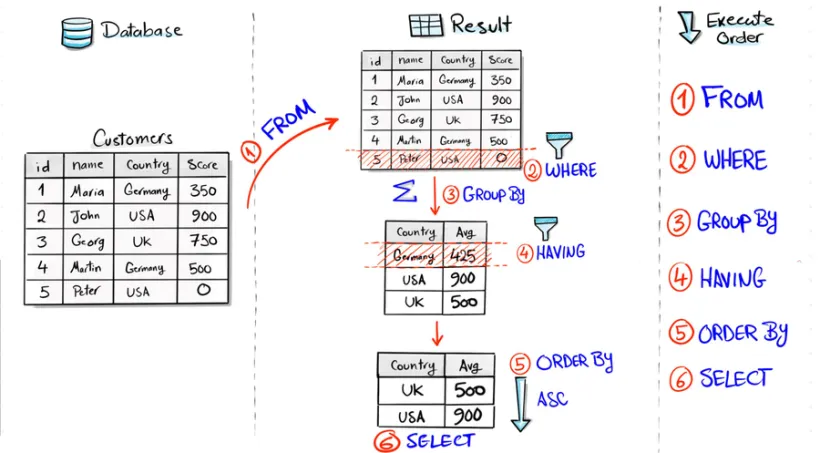
Hand-drawn sketch of how the database really runs a query: FROM, then WHERE, GROUP BY, HAVING, ORDER BY, and SELECT last
you write SELECT first, it runs lastso WHERE cannot see your alias: it runs before SELECTsection 2
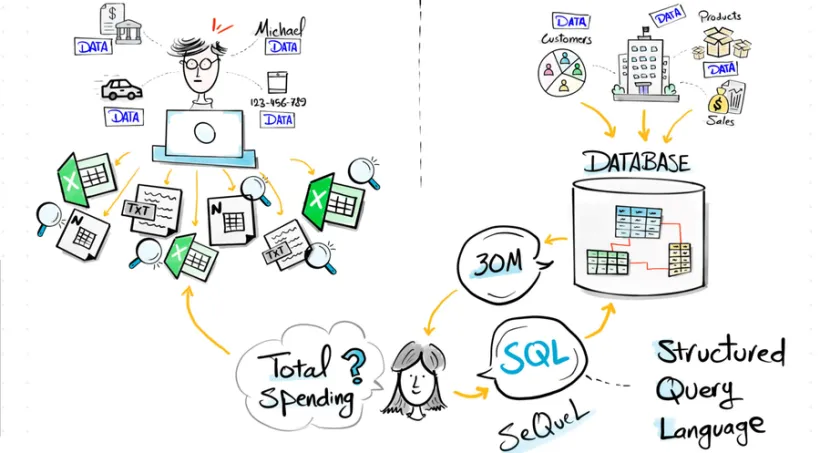
Hand-drawn sketch of a person drowning in scattered Excel and text files, next to one database answering the total spending question instantly
databases beat filessection 1
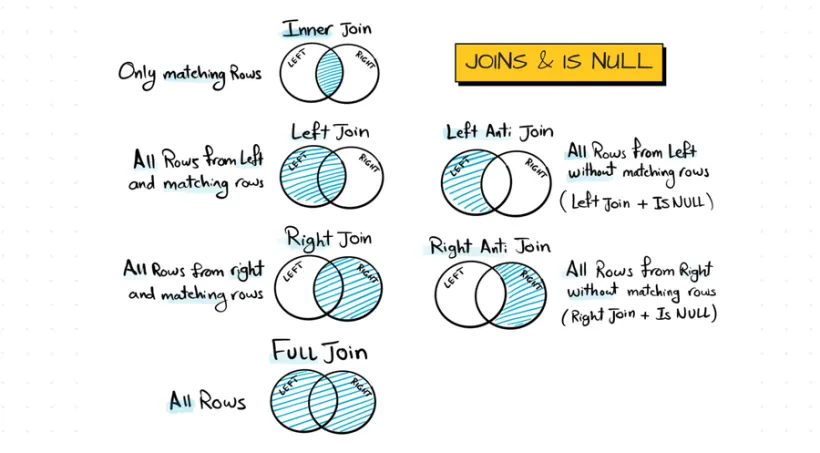
Hand-drawn venn diagrams of every SQL join: inner, left, right, full, plus left and right anti joins
every join on one pagesection 6
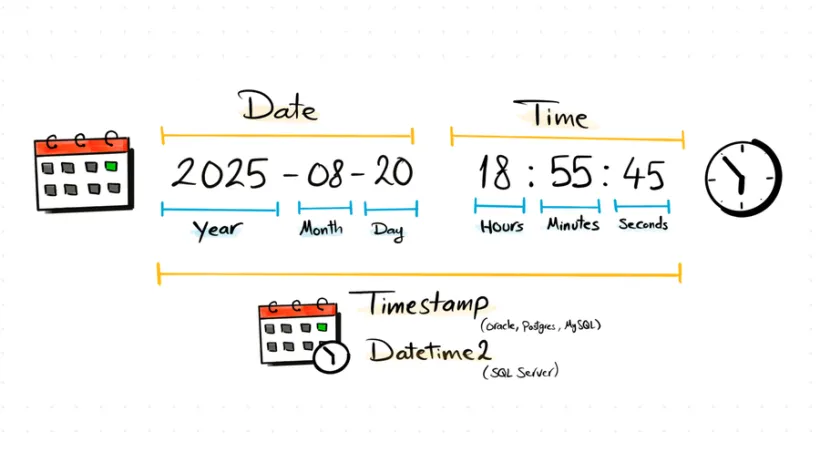
Hand-drawn anatomy of a datetime: calendar and clock around 2025-08-20 18:55:45 broken into year, month, day, hours, minutes, seconds
inside a datetimesection 9
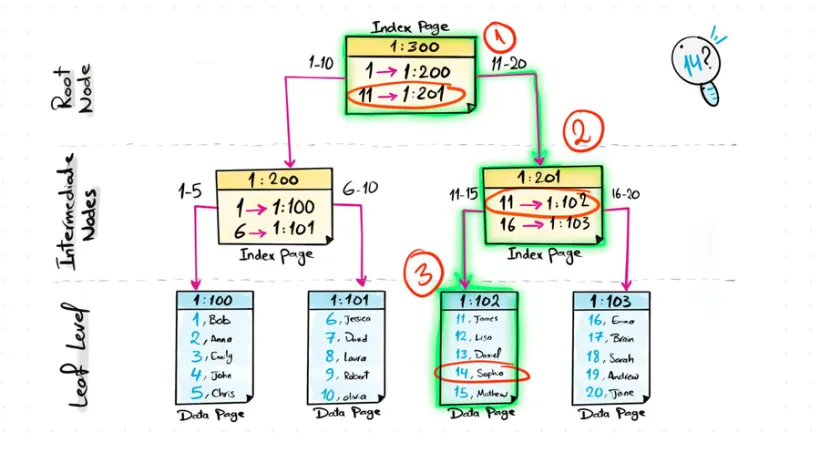
Hand-drawn B-tree of index pages showing how the database finds row 14 in three hops, from root node to data page
finding row 14 in 3 hopssection 21
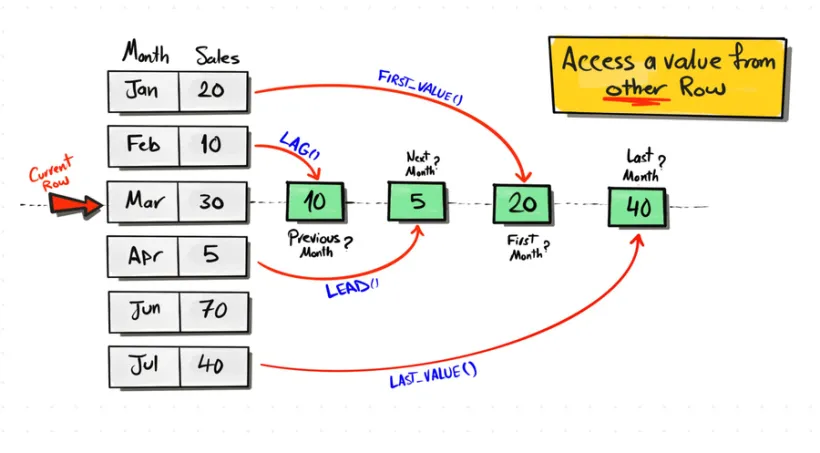
Hand-drawn sketch of LAG, LEAD, FIRST_VALUE and LAST_VALUE reaching from the current row to other rows with red arrows
reach into other rowssection 15
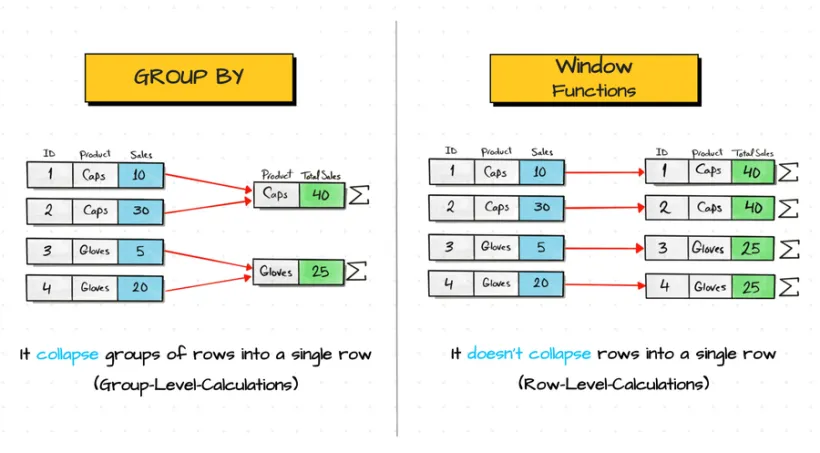
Hand-drawn comparison: GROUP BY collapses rows into a single row, window functions keep every row
the #1 interview questionsection 12
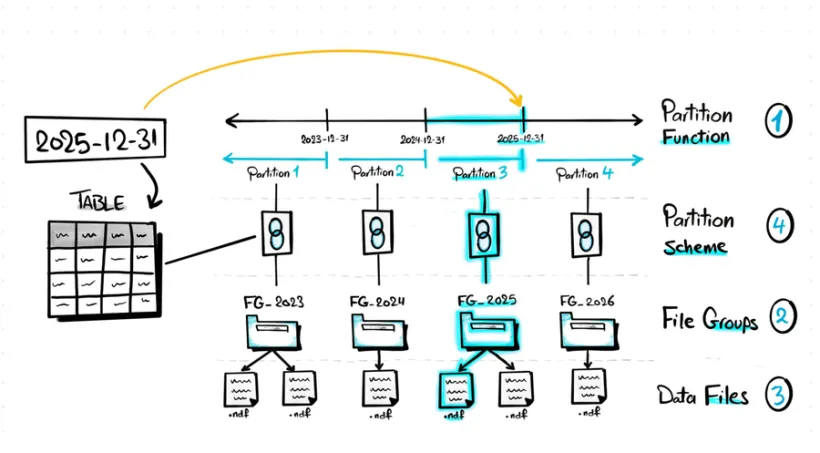
Hand-drawn flow of table partitioning: partition function, partition scheme, file groups, down to the data files on disk
partitions on disksection 22
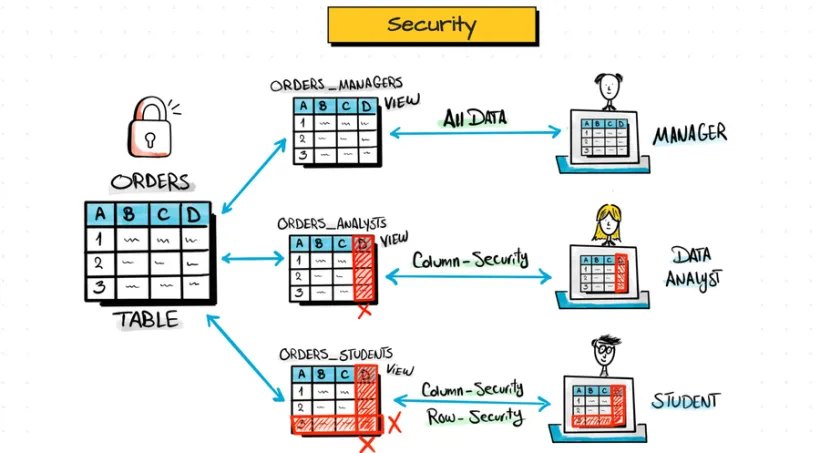
Hand-drawn sketch of one ORDERS table behind three views: the manager sees all data, the analyst and student see masked columns and rows
one table, 3 viewssection 18
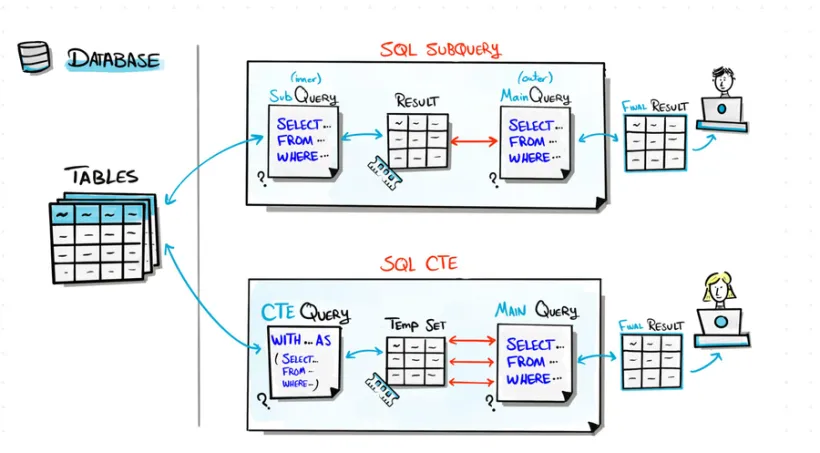
Hand-drawn flow comparing a SQL subquery and a CTE: inner query feeding an outer query versus a WITH clause feeding the main query
subquery vs CTEsection 16
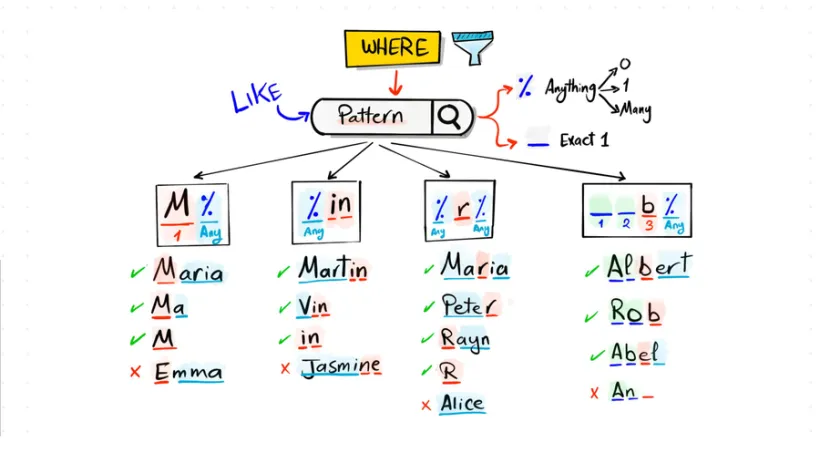
Hand-drawn map of LIKE patterns: percent and underscore wildcards with four pattern cards and names that match or fail each one
LIKE, finally clearsection 5
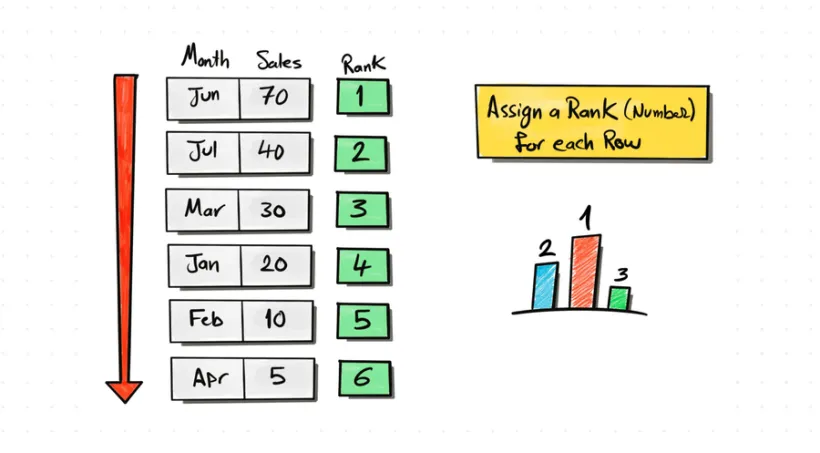
Hand-drawn ranking sketch: a sorted sales table gets a rank number per row, next to a small podium bar chart
the leaderboardsection 14
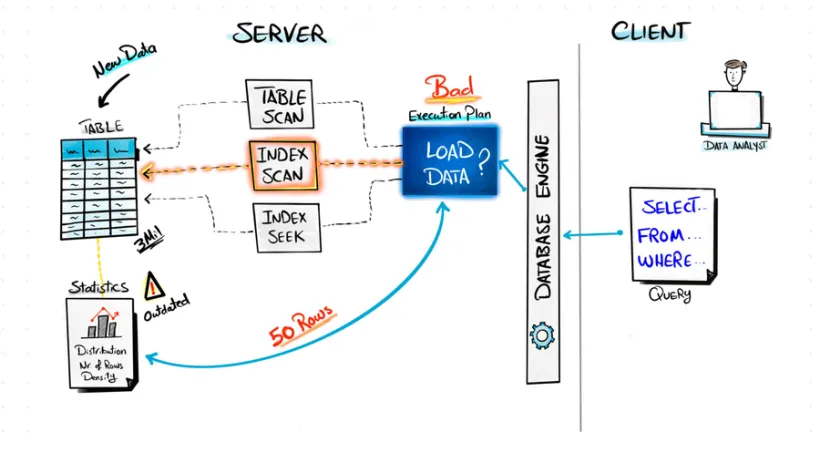
Hand-drawn database engine choosing between table scan, index scan and index seek, with outdated statistics flagged as the cause of a bad execution plan
inside the optimizersection 23
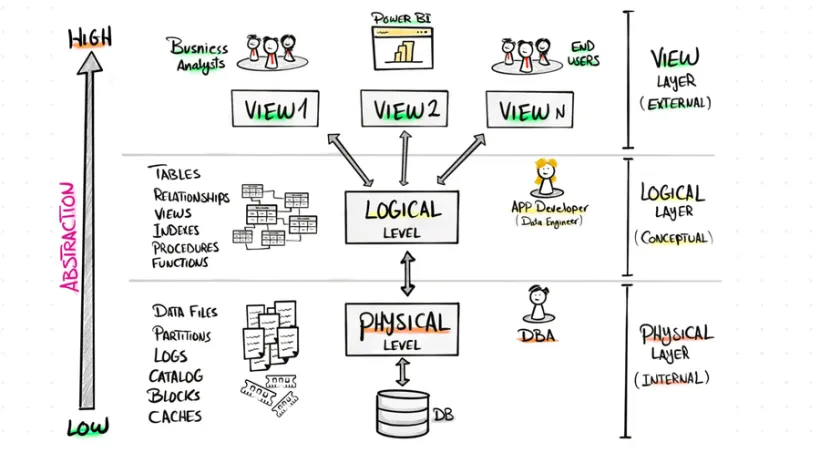
Hand-drawn three-layer architecture of a database: view layer with analysts and Power BI, logical layer, physical layer down to the DB files
3 layers deepsection 18
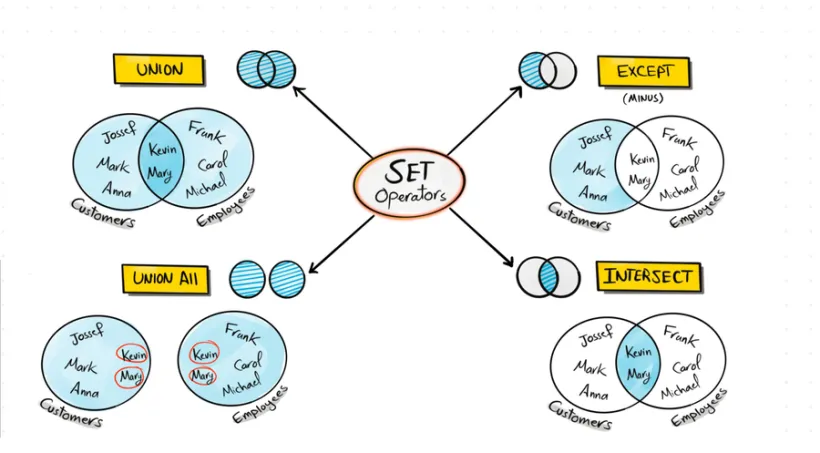
Hand-drawn map of the SQL SET operators: UNION, UNION ALL, EXCEPT and INTERSECT shown as venn diagrams with real names
SET operatorssection 7
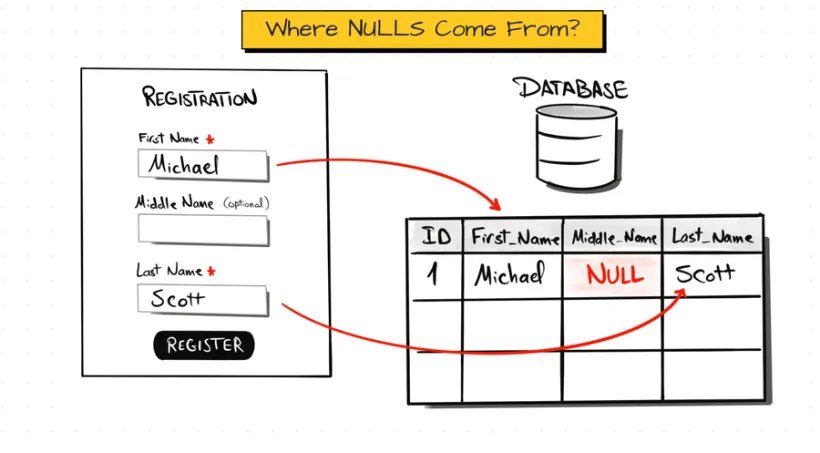
Hand-drawn story of where NULLs come from: an optional middle name left empty on a registration form becomes a red NULL in the database table
how NULLs happensection 10

I drew every single one of these by hand. 200+ of them waiting inside.

What you’ll learn in this course

  • What SQL is and how a database stores your data
  • Your first queries with SELECT, WHERE, GROUP BY and ORDER BY
  • How to create tables and change the data in them
  • How to combine tables with JOINs and SET operators
  • Text, date and NULL functions, and CASE WHEN
  • Window functions: ranking, running totals and comparing rows
  • Subqueries, CTEs, views and temp tables
  • Stored procedures, indexes and partitions
  • How to make slow queries fast
  • Three projects: a data warehouse, an exploratory data analysis and an advanced analytics project

Who is this course for

  • Complete beginners who have never written a query
  • Students who want SQL before their first data job
  • Analysts, engineers and scientists who need solid SQL in their daily work
  • Anyone who learns better from sketches than from slides

Reviews

What students say

4.7

(12,670 ratings)

66,000+ enrolled

  • I used this course to study for an upcoming interview and finally landed my first SQL Development role! I cannot express how much this SQL course compares to other courses on here. The instructor goes in depth on each topic and explains how the database executes each query. I cannot thank Baraa Khatib Salkini enough!

    Amanda O.October 2026

  • I have been working with SQL for about 4 years now, mainly to develop PBI models. I picked up knowledge piecemeal and as needed, not ideal as my level of understanding did not develop from the foundations. There have been a lot of "aha" moments for me in this course. The conceptual slides, combined with the SQL examples are excellent! Great job, Baraa!

    Murray S.March 2026

  • Baraa did a great job making complex SQL topics easy to understand and super relevant to real world business scenarios. I used this course alongside my Database Systems class and it played a huge role in helping me earn an A! The depth and clarity of instruction are top-notch!

    Mohani S.August 2025

  • Understanding the concepts is more important than just memorization. And this is what this amazing SQL course does. I now have the understanding and strong foundation for my SQL and data engineer career. You are an amazing instructor. I'm glad I found your course

    Albert C.June 2025

  • I am really encouraged with the way the instructor explains things. he understands how to explain things to beginners like me. The visual animations are a huge help. It gives me a diagram to see what is happening and how each term is connected and it's purpose.

    Arlene K.April 2026

  • Take my money! Very professional course, excellent sound, Baraa is the great Teacher, easy to understand explanations, nice graphics. I am confident in SQL after completing the course. I recommend this course.

    Marek B.May 2025

Built from experience

Built from 17 years inside real companies.

For 17 years I built data platforms at Mercedes-Benz, Bosch and IBM. At Mercedes-Benz my team built one of its largest lakehouses. This course teaches SQL the way it is written there: how data is stored, cleaned and queried in real companies.

The patterns I used in real projects, not textbook examples

Every concept drawn by hand before you type it, 200+ sketches

Real business datasets and the problems data teams solve every day

Baraa Khatib Salkini at his desk, in front of two screens of code

What you build

Three projects for your CV.

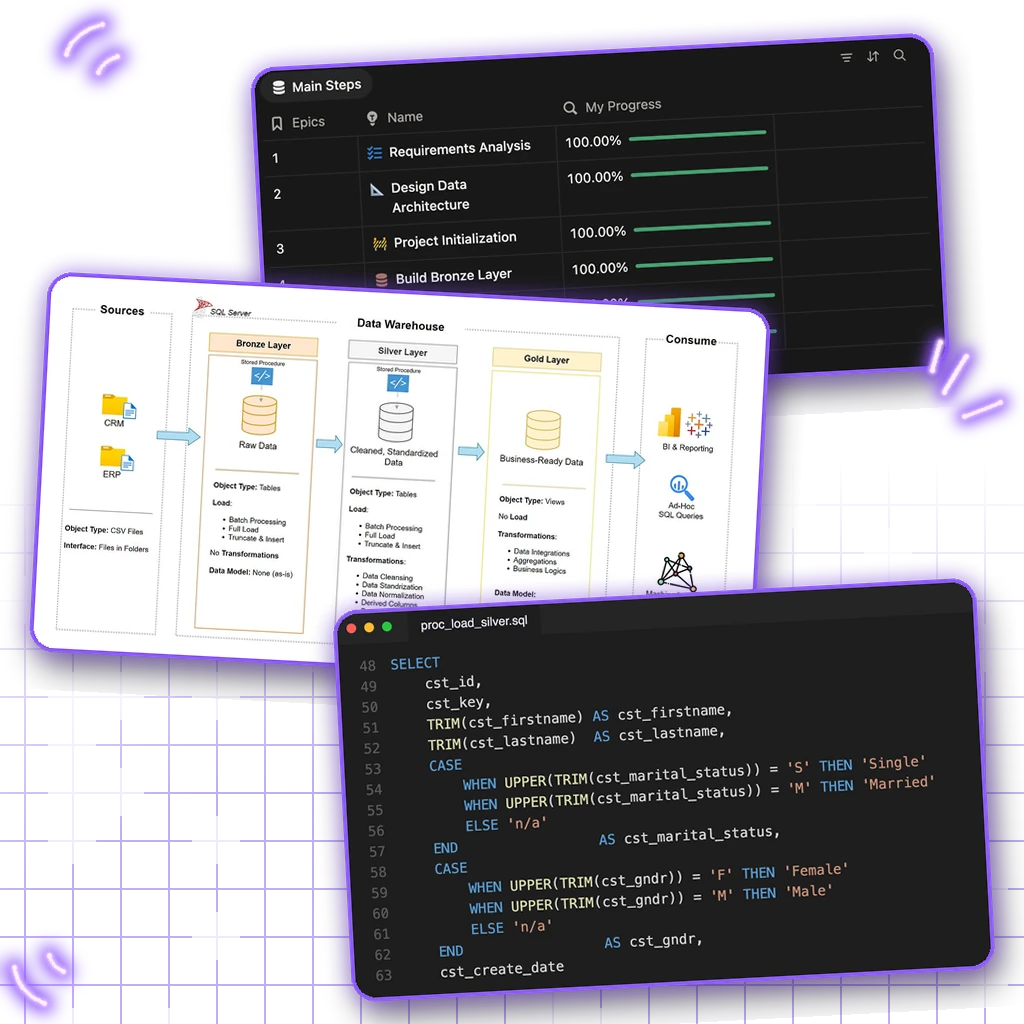
The course ends with three projects, the way I do them in my real work: a data warehouse with bronze, silver and gold layers, an exploratory data analysis, and an advanced analytics project with the questions a business actually asks.

SQL Data Warehouse Project, 36 lessons

Exploratory Data Analysis Project (EDA), 12 lessons

SQL Advanced Data Analytics Project, 9 lessons
see the three projects
The data warehouse project in three steps: the Notion project plan, the architecture with the bronze, silver and gold layers, and the SQL of the silver layer load in an editor

Course curriculum

30h

304 lectures

28 sections

01Introduction to SQL10 lectures · 42m
  1. Course Introduction1:29
  2. Course Resources
  3. Course Roadmap & Structure5:51
  4. What is SQL and What are Databases?3:13
  5. What is DBMS?2:18
  6. Types of Databases2:13
  7. Database Structure2:54
  8. SQL Commands2:10
  9. Why Learn SQL?2:05
  10. Environment Setup: SQL Server, SSMS and Databases20:04
02SELECT Queries11 lectures · 1h 1m
  1. What is SQL Query1:46
  2. Components of SQL2:45
  3. SELECT & FROM8:01
  4. WHERE6:03
  5. ORDER BY8:55
  6. GROUP BY8:17
  7. HAVING7:57
  8. DISTINCT3:22
  9. TOP5:13
  10. Coding & Execution Order4:00
  11. Cool SQL Stuff4:50
03Data Definition (DDL)3 lectures · 11m
  1. CREATE6:19
  2. ALTER3:23
  3. DROP1:45
04Data Manipulation (DML)3 lectures · 24m
  1. INSERT13:26
  2. UPDATE6:30
  3. DELETE4:21
05Filtering Data8 lectures · 41m
  1. Intro - What is Data Filtering1:16
  2. Comparison Operators9:15
  3. AND Operator4:41
  4. OR Operator2:53
  5. NOT Operator3:28
  6. BETWEEN Operator4:28
  7. IN Operator4:14
  8. LIKE Operator10:46
06SQL Joins13 lectures · 1h 16m
  1. Intro - What is Data Combining1:33
  2. Intro to JOINS8:57
  3. NO JOIN1:40
  4. INNER JOIN12:30
  5. LEFT JOIN7:12
  6. RIGHT JOIN4:55
  7. FULL JOIN4:39
  8. LEFT ANTI JOIN4:04
  9. RIGHT ANTI JOIN4:56
  10. FULL ANTI JOIN6:57
  11. CROSS JOIN3:16
  12. Choosing the Right JOIN1:39
  13. Multiple Table JOINS13:22
07SQL SET Operators9 lectures · 45m
  1. Introduction to SET Operators0:33
  2. Set Rules & Syntax11:58
  3. UNION5:25
  4. UNION ALL3:54
  5. EXCEPT5:18
  6. INTERSECT2:37
  7. Use Case – Combining Information9:43
  8. Use Case – Delta Detection3:55
  9. SET Operators Summary2:03
08String Functions10 lectures · 36m
  1. Intro - What is Data Transformation1:03
  2. SQL Functions5:16
  3. CONCAT3:04
  4. UPPER & LOWER2:30
  5. TRIM5:27
  6. REPLACE3:31
  7. LEN1:49
  8. LEFT & RIGHT3:11
  9. SUBSTRING6:08
  10. Number Functions4:14
09Date & Time Functions18 lectures · 1h 28m
  1. What is Date & Time3:31
  2. Overview of Date & Time Functions2:39
  3. DAY, MONTH, YEAR2:59
  4. DATEPART5:53
  5. DATENAME4:34
  6. DATETRUNC8:10
  7. EOMONTH3:31
  8. Use Cases – Date Extraction5:03
  9. Comparing Extract Functions3:38
  10. Introduction to Formatting & Casting5:34
  11. FORMAT13:13
  12. CONVERT6:24
  13. CAST5:08
  14. DATEADD4:43
  15. DATEDIFF4:21
  16. ISDATE7:24
  17. Date & Time Summary1:08
  18. Date & Time Scripts
10NULL Functions11 lectures · 1h 9m
  1. Introduction to NULLs2:36
  2. COALESCE vs ISNULL11:30
  3. Handling NULLs – Data Aggregation3:39
  4. Handling NULLs – Mathematical Operations6:10
  5. Handling NULLs – Joining Data7:05
  6. Handling NULLs – Sorting Data5:32
  7. NULLIF5:57
  8. IS NULL & IS NOT NULL9:41
  9. NULL vs Empty vs Blank6:01
  10. Handling NULLs – Data Policies8:35
  11. NULL Summary1:52
11CASE WHEN Statement6 lectures · 36m
  1. Introduction to CASE Statements9:34
  2. Use Case – Categorizing Data5:18
  3. CASE Rules1:30
  4. Use Case – Mapping Values8:51
  5. Use Case – Handling NULLs8:32
  6. CASE Statement Summary1:49
12Window Functions Basics9 lectures · 1h 10m
  1. Intro - What is Data Aggregation6:34
  2. Aggregate Functions6:34
  3. Window Functions vs Group By12:41
  4. Syntax of Window Functions5:02
  5. Window Partition By10:11
  6. Window Order By4:16
  7. Window Frame14:26
  8. Window Function Rules7:38
  9. Window Basic Summary2:26
13Window Aggregate Functions8 lectures · 1h 6m
  1. Introduction to Window Aggregate Functions2:03
  2. Window COUNT16:42
  3. Window SUM7:27
  4. Window AVG9:03
  5. Window MIN & MAX9:37
  6. Use Case: Rolling & Running Total9:36
  7. Use Case: Moving Average9:07
  8. Window Aggregate Functions Summary2:32
14Window Ranking Functions12 lectures · 1h 3m
  1. Introduction to Ranking Functions4:54
  2. Window ROW_NUMBER4:25
  3. Window RANK4:04
  4. Window DENSE_RANK4:25
  5. ROW_NUMBER vs RANK vs DENSE_RANK1:02
  6. Use Cases: Top/Bottom N Analysis7:15
  7. Use Cases: Assign Unique IDs2:47
  8. Use Cases: Identify Duplicates5:34
  9. Window CUME_DIST4:50
  10. Window PERCENT_RANK7:48
  11. Window NTILE13:39
  12. Window Ranking Function Summary2:09
15Window Value Functions7 lectures · 50m
  1. Introduction to Window Value Functions3:39
  2. Window LEAD & LAG9:44
  3. Use Case: Month-Over-Month (MoM)6:49
  4. Use Case: Customer Retention8:45
  5. Use Case: Time Gap Analysis5:43
  6. Window FIRST & LAST12:10
  7. Window Value Functions Summary3:16
16Subqueries15 lectures · 1h 37m
  1. Challenges in Complex Projects17:27
  2. What is Subquery?2:45
  3. Why Subquery?2:07
  4. Subquery Categories2:06
  5. Subquery Result Types2:30
  6. Subquery in FROM10:52
  7. How DB Executes Subquery1:36
  8. Subquery in SELECT7:02
  9. Subquery in JOIN5:02
  10. Subquery in WHERE6:44
  11. Subquery using IN Operator8:29
  12. Subquery using ALL & ANY Operators6:13
  13. Correlated Subquery10:46
  14. Subquery using Exists12:19
  15. Subquery Summary1:25
17Common Table Expression (CTE)10 lectures · 1h 17m
  1. Introduction to CTE6:03
  2. Why CTE?4:55
  3. How DB Executes CTE2:16
  4. CTE Types0:35
  5. Standalone CTE8:42
  6. Multiple Standalone CTE8:04
  7. Nested CTE13:37
  8. CTE Best Practices2:41
  9. Recursive CTE27:29
  10. CTE Summary2:22
18Views15 lectures · 1h 7m
  1. Database Structure & Views5:26
  2. What is DDL5:30
  3. 3 Levels Architecture4:47
  4. What is View1:57
  5. Views vs Tables1:39
  6. Use Case: Central Logic3:18
  7. Views vs CTEs1:44
  8. CREATE, ALTER, DROP Views12:16
  9. How DB Executes View3:00
  10. Use Case: Hide Complexity10:35
  11. Use Case: Data Security6:36
  12. Use Case: Flexibility2:14
  13. Use Case: Multi-Language2:04
  14. Use Case: Data Warehouse3:22
  15. View Summary2:31
19CTAS & TEMP Tables15 lectures · 51m
  1. Introduction to Tables3:28
  2. CTAS vs CREATE/INSERT2:44
  3. CTAS vs Views4:50
  4. CTAS Syntax2:43
  5. Use Case: Optimize Performance7:39
  6. How DB Executes CTAS0:53
  7. Use Case: Snapshots1:26
  8. Use Case: Data Warehouse2:15
  9. Introduction to TEMP Tables2:19
  10. TEMP Syntax & Example6:42
  11. How DB Executes TEMP Tables1:26
  12. TEMP Table Use Cases2:48
  13. My opinion about TEMP Tables0:24
  14. Table Summary1:59
  15. Compare All Methods9:28
20Stored Procedures10 lectures · 56m
  1. Introduction to Stored Procedures9:26
  2. Basics of Stored Procedures4:05
  3. Parameters6:49
  4. Multi-Queries in Stored Procedure3:06
  5. Variables7:39
  6. Control Flow IF ELSE6:36
  7. Error Handling TRY & CATCH5:18
  8. Styling Stored Procedures2:48
  9. What are Triggers2:11
  10. Triggers Use Case8:28
21Indexes23 lectures · 2h 30m
  1. Introduction to Indexes1:32
  2. Types of Indexes1:41
  3. Heap Structure6:01
  4. Clustered Index6:10
  5. NonClustered Index4:46
  6. Clustered vs NonClustered Index8:07
  7. How to Create INDEX8:44
  8. Composite Index4:51
  9. What is Columnstore Index?1:45
  10. Process of Building Columnstore Index6:30
  11. Columnstore vs Rowstore Index6:54
  12. How to Create Columnstore Index10:45
  13. Unique Index5:34
  14. Filter Index5:41
  15. Choose Right Index3:30
  16. Monitor Usage13:41
  17. Monitor Missing Indexes3:15
  18. Monitor Duplicate Indexes3:08
  19. Update Statistics8:21
  20. Fragmentations6:06
  21. Execution Plan25:33
  22. SQL hints6:14
  23. Indexing Strategy1:07
22Partitions4 lectures · 32m
  1. Introduction to Partitions4:52
  2. The Process of Partitions17:18
  3. Create Partitioned Tables6:44
  4. The Performance of Partitions3:36
23Performance Best Practices9 lectures · 41m
  1. Introduction to Performance Tips1:27
  2. Performance Tips for Fetching Data2:47
  3. Performance Tips for Filtering5:21
  4. Performance Tips for Joining12:49
  5. Performance Tips for Aggregation2:15
  6. Performance Tips for Subqueries5:13
  7. Performance Tips for Table DDL7:36
  8. Performance Tips for Indexing2:04
  9. Performance Tips Summary1:06
24Copilot & ChatGPT for SQL7 lectures · 59m
  1. Introduction to AI & SQL3:36
  2. What is ChatGPT & Copilot2:11
  3. ChatGPT vs Copilot4:23
  4. How to Use Copilot5:38
  5. ChatGPT Prompt Structure3:25
  6. ChatGPT Prompts for SQL Developers27:48
  7. ChatGPT Prompts for SQL Learning12:13
25SQL Data Warehouse Project36 lectures · 4h 18m
  1. Project Resources
  2. SQL Project Types1:24
  3. Intro to Data Warehouse (DWH)6:47
  4. What is ETL3:52
  5. ETL Methods7:12
  6. Get Project Resources2:10
  7. Notion for Project Management7:35
  8. Understand Project Requirements3:12
  9. Data Architecture Approaches6:25
  10. Design the Data Warehouse Layers6:53
  11. Draw DWH Architecture8:18
  12. Refine the Project Plan0:51
  13. Define The Naming Conventions6:26
  14. Prepare Your Git Repo4:24
  15. Create The Database5:12
  16. Bronze Layer | Analyze Source Systems5:18
  17. Bronze Layer | DDL Create Tables5:36
  18. Bronze Layer | Load Scripts7:53
  19. Bronze Layer | Build Stored Procedure13:06
  20. Bronze Layer | Document The Work4:55
  21. Silver Layer | Exploring Data12:26
  22. Silver Layer | DDL Create Tables3:42
  23. Silver Layer | Load Script 115:08
  24. Silver Layer | Load Script 220:40
  25. Silver Layer | Load Script 316:46
  26. Silver Layer | Load Script 418:47
  27. Silver Layer | Build Stored Procedure5:47
  28. Silver Layer | Document The Work3:31
  29. Gold Layer | Data Modelling6:57
  30. Gold Layer | Analysis3:49
  31. Gold Layer | Build Dimension Customers16:23
  32. Gold Layer | Build Dimension Products7:09
  33. Gold Layer | Build Fact Sales6:01
  34. Gold Layer | Draw The Data Model5:05
  35. Gold Layer | Create Data Catalog2:38
  36. Gold Layer | Document The Work5:29
26Exploratory Data Analysis Project (EDA)12 lectures · 50m
  1. Project Resources
  2. Introduction to EDA0:17
  3. Data Analytics Project Roadmap1:53
  4. Get Project Resources3:44
  5. Dimensions vs Measures4:34
  6. Database Exploration1:53
  7. Dimensions Exploration3:48
  8. Date Exploration5:14
  9. Measure Exploration8:31
  10. Magnitude Analysis11:26
  11. Ranking Analysis7:23
  12. What is EDA and Why Data Analysts do it?1:14
27SQL Advanced Data Analytics Project9 lectures · 1h 17m
  1. Introduction to the Project0:42
  2. Change Over Time Analysis8:23
  3. Cumulative Analysis7:50
  4. Performance Analysis12:24
  5. Part to Whole Analysis7:22
  6. Data Segmentation15:49
  7. Build Customers Report19:12
  8. Build Products Report3:37
  9. Document Your Work in Git2:09
28Thank You1 lecture · <1m
  1. Congratulations & Thank You Video0:18

Questions

Questions people ask

Can I use MySQL or PostgreSQL instead of SQL Server?

Yes. I teach on SQL Server, but the course databases come ready for MySQL and PostgreSQL too, plus CSV files. The core SQL is the same in all three, and only some functions have different names.

Does it work on a Mac?

Yes. The setup guide takes you through Windows and Mac step by step. On a Mac, SQL Server runs in Docker, and the course gives you a file that starts it with one click.

Do I get a certificate?

Yes. When you finish the course, you get a certificate of completion. You can add it to your CV and your LinkedIn profile.

Do I need to know anything before?

No. The course starts from zero: what a database is, how to set it up, and how to write your first query. You don’t need any programming.

Is this course all I need?

Yes. It takes you from your first query to advanced SQL and performance, and you finish with three real projects. It covers the SQL every data role needs, whether you work as an analyst, an engineer or a scientist.

Start the course today.

$19.99, one payment, no subscription. 30 hours, 304 lectures, three projects and a certificate.

Enroll now
The SQL Handbook

Handbook

The handbook for this course

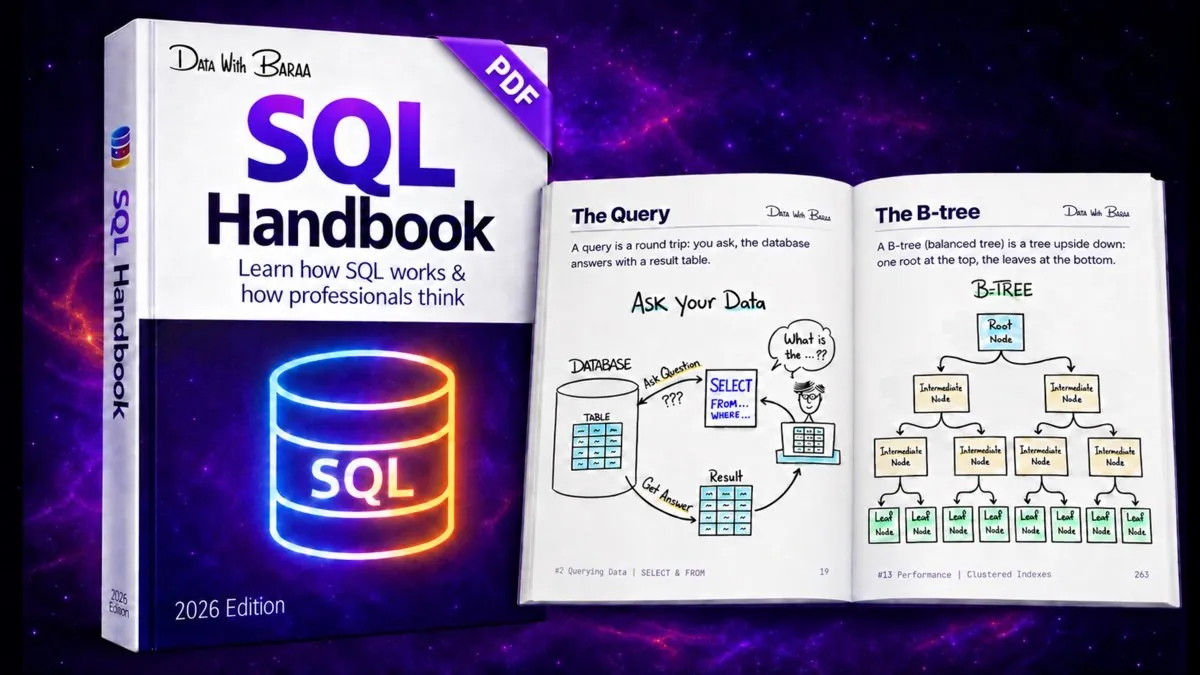
The SQL Handbook: 328 pages and 101 hand-drawn sketches, the PDF that goes with these lessons. $9.99, one-time payment.

The Ultimate SQL Mastery

$19.99 · one payment

Enroll now